
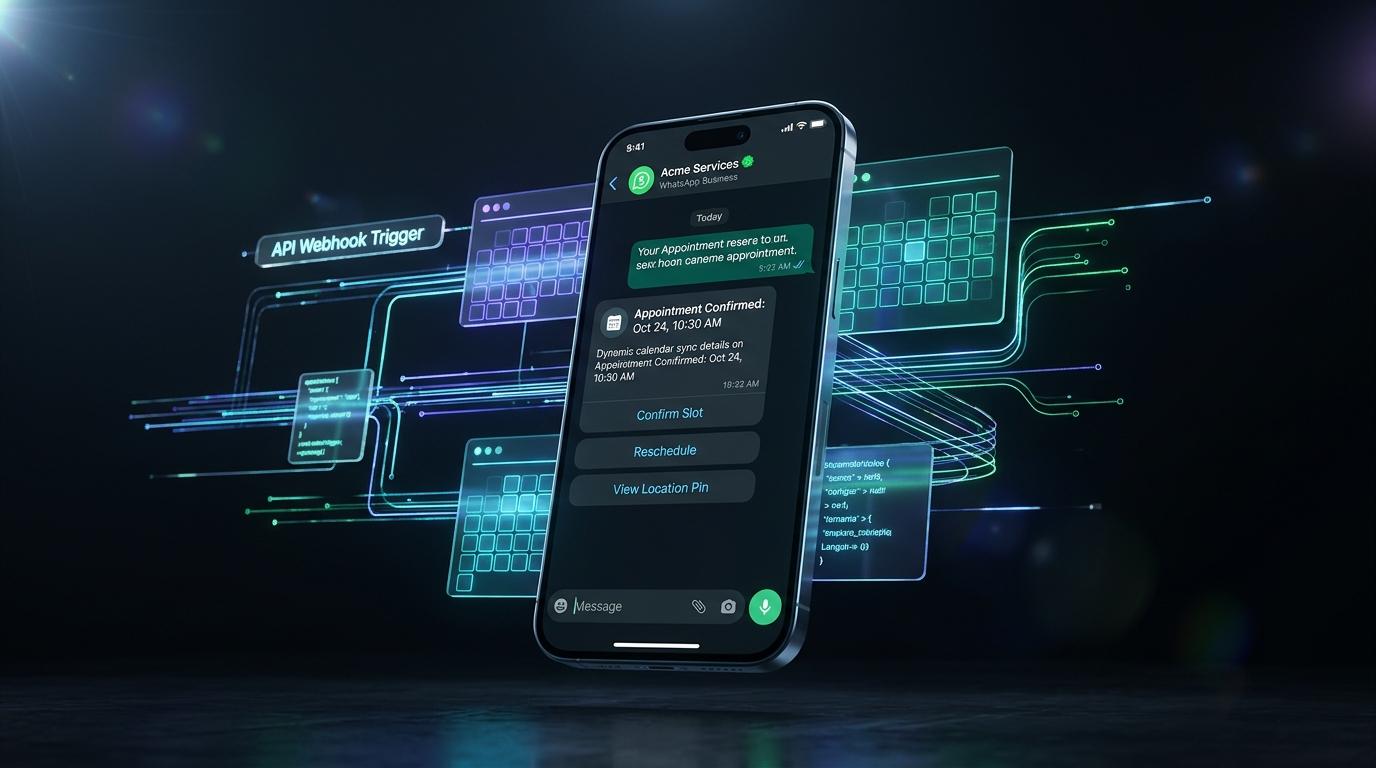
Stop losing hard-earned revenue to empty appointment slots. Discover why custom WhatsApp appointment automation outperforms generic SaaS tools for local business growth in 2026.
The High Cost of No-Shows and the WhatsApp Advantage
For local businesses running on appointment schedules — dental clinics, aesthetic studios, specialized legal consultants, diagnostic labs, and wellness centers — an empty chair is not an inconvenience; it is permanent, unrecoverable revenue loss.
This issue compounds quickly. A no-show doesn't just sacrifice the service fee; it wastes paid staff hours, consumes facility overhead, and blocks high-intent customers who were turned away. Manual follow-up — receptionist calls between clients, manual SMS broadcasts — creates operational exhaustion without guaranteeing results.
Channel Performance Comparison: Why WhatsApp Dominates
| Channel Matrix | Traditional Email | Standard SMS | Official WhatsApp Business |
|---|---|---|---|
| Average Open Rate | 15% – 22% (buried in Spam / Promotions) | 70% – 80% (swiped away unread) | 98% (checked within 3 minutes) |
| Click-Through / Response Rate | 2% – 5% | 10% – 15% | 45% – 60% |
| Interactive Action Buttons | Static HTML links only | Plain text links (flagged as spam) | Native Quick-Reply Buttons (Confirm, Reschedule) |
| Rich Media Support | Limited inline images | Plain text only (160 character limit) | Google Maps Pins, PDF Invoices, Rich Media |
| Carrier / Telecom Filtering | Heavy spam filter algorithms | Strict Indian DLT / US 10DLC restrictions | Verified Tier-1 Meta Direct Routing |
| Conversion Uplift | Baseline | +12% over email | +47% higher conversion than SMS |
Customers check WhatsApp dozens of times throughout their day for family and peer conversations. A direct notification appearing in that inbox carries personal priority.
Market data confirms this channel dominance:
- WhatsApp business notifications achieve an average open rate of approximately 98% with click-through rates between 45% and 60%.
- WhatsApp conversion rates consistently run 47% higher than traditional SMS.
However, automating appointment reminders on WhatsApp requires more than picking a tool. The true differentiator is the underlying software infrastructure — and that is where the vast gulf between rented generic SaaS and custom-engineered automation becomes decisive.
Official Cloud API vs. Unofficial Tools: Protecting Your Business Number
The single catastrophic risk in WhatsApp automation is not a missed notification — it is a permanent Meta ban on your primary business telephone number.
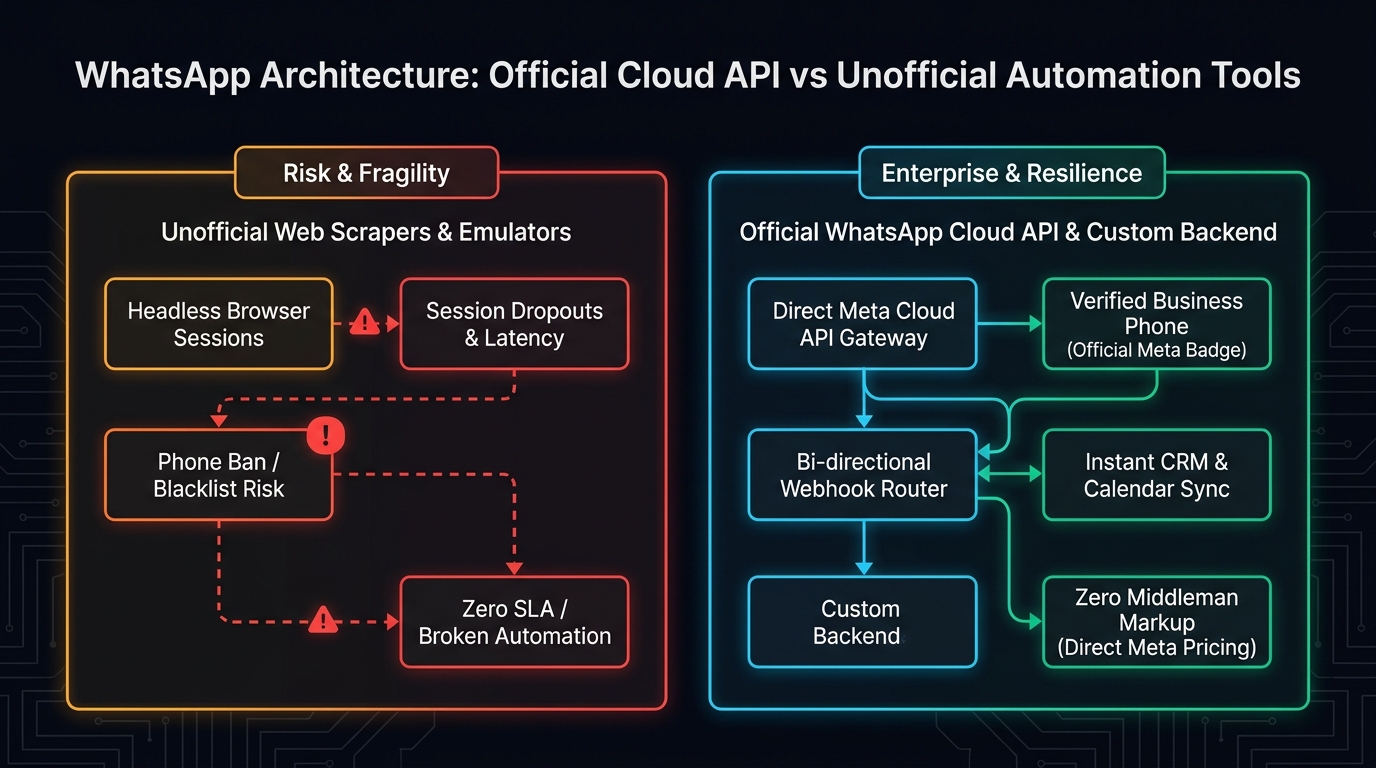
Many low-cost automation providers rely on unauthorized web scrapers or browser-emulating gateways (often built on Puppeteer or WhatsApp Web wrappers). These unauthorized tools violate Meta's Terms of Service. Meta actively deploys automated heuristic scans to detect non-standard socket traffic. When flagged, your business number is permanently suspended without warning, without recourse, and taking your entire customer contact history with it.
Architecture Comparison: Official Meta API vs. Unofficial Scrapers
| Technical Parameter | Unofficial Scrapers & Web Gateways | Official Meta WhatsApp Cloud API |
|---|---|---|
| Meta Compliance | ❌ Violates Terms of Service | ✅ 100% Authorized & Meta-Sanctioned |
| Phone Number Ban Risk | 🚨 Extremely High (automated heuristic ban) | 🛡️ Zero Ban Risk (verified enterprise gateway) |
| Delivery Infrastructure | Fragile browser sessions on shared proxies | Tier-1 direct Meta cloud routing with SLA |
| Latency & Speed | High latency (5–30 seconds per message) | Sub-second instantaneous delivery |
| Two-Way Webhook Stability | Frequently drops connection on browser restart | High-concurrency event-driven webhooks |
| Green Checkmark Eligibility | Impossible | Supported for verified corporate brands |
| Scalability Limit | Collapses at 50–100 messages/hour | Millions of daily messages without throttling |
At Cloud Ninja Dev, every AI automation solution and WhatsApp bot is architected exclusively on Meta's official Cloud API, providing ironclad longevity for your business communication channels.
Dynamic Variable Mapping & Interactive Two-Way Handlers
A generic notification that states "You have a booking tomorrow" is easily ignored. A personalized WhatsApp message confirming the practitioner, the exact slot, and providing instant interactive action buttons drives immediate compliance.
In a bespoke automation system, dynamic variable mapping extracts real-time metadata from your scheduling source — such as your database, booking engine, or Google Calendar — and injects it into pre-approved Meta message templates:
┌─────────────────────────────────────────────────────────────┐
│                 SAMPLE INTERACTIVE MESSAGE                  │
├─────────────────────────────────────────────────────────────┤
│ "Hi Dr. Sharma's Clinic:                                   │
│  Hello Ananya! Your dental consultation with Dr. Sharma    │
│  is confirmed for Thursday, Oct 24 at 4:30 PM.             │
│                                                             │
│  📍 Location: Indiranagar Clinic (Google Maps Pin Attached) │
│                                                             │
│  [  ✅ Confirm Slot  ]  [  🔄 Reschedule  ]  [  ❌ Cancel  ] │
└─────────────────────────────────────────────────────────────┘
When the client taps "Confirm Slot", an automated webhook fires into your backend, updating the status in your PostgreSQL database to Verified. If the client taps "Reschedule", the system automatically triggers a conversational flow presenting the next three available slots, allowing the client to self-serve without staff intervention.
This closed-loop interactivity cuts administrative phone time by over 80% while keeping your booking schedule synchronized (learn how custom architectures eliminate double-booking in our guide on why custom appointment booking beats SaaS).
Understanding Meta's Conversation-Based Pricing: Stop Paying SaaS Markups
A major hidden trap with commercial SaaS booking tools (like Wati, Interakt, or generic CRM add-ons) is their pricing structure. Not only do they charge high monthly subscription fees, but they also tack on a 100% to 300% markup on top of Meta's raw conversation fees.
Meta operates on a transparent, 24-hour conversation-window model divided into four distinct categories:
| Meta Conversation Category | Use Case in Appointment Systems | Cost Profile |
|---|---|---|
| Utility Conversations | Appointment confirmations, schedule reminders, payment receipts | Lowest-cost tier; highly economical for high-volume transactions |
| Authentication Conversations | One-time passwords (OTPs), client login verification codes | Standard transactional rate with strict template requirements |
| Service Conversations | Inbound client inquiries ("What are your hours?", "Do you take insurance?") | Completely FREE within the 24-hour customer service window |
| Marketing Conversations | Promotional seasonal discounts, new treatment announcements | Premium rate tier governed by strict opt-in guidelines |
The Custom Software Cost Advantage
When Cloud Ninja Dev engineers your custom software and backend automation, your application connects directly to your own Meta Cloud API account.
- Zero Third-Party Markups: You pay Meta's wholesale per-conversation rates directly.
- No Artificial Conversation Limits: Never worry about your booking notifications getting throttled because you hit a SaaS platform's monthly limit.
- Unlimited Team Seats: Your front-desk staff, clinic managers, and partners access the dashboard without paying extra per-seat licenses.
Build vs. Buy: Why Custom Automation Wins for Growing Founders
Subscription SaaS tools offer quick setups, but their constraints become severe as operations expand:
| Operational Metric | Generic Chatbot SaaS | Custom WhatsApp Automation Engine |
|---|---|---|
| Monthly Overhead | Compounding monthly rent + hefty per-message markups | One-time 14-day sprint build; wholesale Meta rates only |
| Branching Logic | Rigid pre-built flows; cannot handle multi-practitioner or multi-chair logic | Infinite adaptability; custom conditional rules tailored to your clinic |
| Data Sovereignty | Client phone numbers and histories stored on vendor's shared cloud | 100% owned database (PostgreSQL / Supabase) with zero vendor lock-in |
| Legacy & Custom Sync | Limited to vendor's app store or fragile Zapier connections | Native API bridges to your internal billing, ERP, or web storefronts |
| Source Code Rights | Zero code ownership; cancel subscription and your entire setup vanishes | 100% full source code ownership transferred to your Git account |
As highlighted by industry observers, "a self-serve chatbot SaaS subscription looks like the cheaper option right up until the workflow needs real branching logic... the point where most businesses realize they've outgrown it."
Owning your system ensures your communication workflows evolve alongside your business rather than stalling at a vendor's pricing paywall.
The Strategic Bottom Line: Measurable Revenue Protection
Deploying official WhatsApp appointment automation is not merely an administrative upgrade — it is an active defense of your gross profit margins:
- Slashing No-Shows by 15%–25%: Industry data proves that businesses utilizing official WhatsApp Business API reminders consistently reduce no-show rates by 15% or more. For a multi-chair dental practice or wellness center, reclaiming 3–5 lost appointments weekly preserves thousands of dollars in monthly revenue.
- Protect Your Business Number: Always insist on the official Meta Cloud API to avoid devastating number bans.
- Connect to Your Central Digital Ecosystem: Ensure your WhatsApp bot shares real-time data with your custom web applications and mobile platforms (explore our cross-platform mobile app development).
- Treat Software as an Asset: Stop leasing communication workflows. Own your source code, your data, and your customer relationships.
Frequently Asked Questions (FAQ)
Why do unofficial WhatsApp automation tools get phone numbers banned?
Unofficial tools bypass Meta's authorized infrastructure by reverse-engineering WhatsApp Web or running headless browsers. Meta's security algorithms actively detect unauthorized socket connections, automated mass-messaging patterns, and emulated clients, leading to immediate and permanent phone number blacklisting. Cloud Ninja Dev builds strictly with the official Meta Cloud API, ensuring 100% compliance and zero ban risk.
How does Meta's conversation-based pricing work for appointment reminders?
Meta charges per 24-hour conversation window rather than per individual message. Appointment confirmations and reminder notifications fall under the economical "Utility" category. Once a utility window opens, you can exchange multiple template updates with that customer within 24 hours at no additional charge. By using a custom build, you pay Meta directly at wholesale cost with zero third-party markups.
Can custom WhatsApp automation sync with Google Calendar and our internal CRM?
Yes. Our custom automation engines feature real-time bi-directional webhooks. When an appointment is scheduled on your website or Google Calendar, a WhatsApp reminder is triggered automatically. Conversely, when a patient replies "Confirm" or "Reschedule" on WhatsApp, the updated status is instantly reflected across your calendar and internal CRM database.
What happens if a customer asks a complex question on WhatsApp?
Our architectures integrate intelligent fallback routing. Routine inquiries (location pin, clinic timings, pricing) can be resolved automatically using custom LLM agents powered by the Gemini or OpenAI APIs. When a query exceeds the bot's threshold, the system automatically routes the conversation to a human staff dashboard with instant notifications.
How quickly can Cloud Ninja Dev deploy a custom WhatsApp automation system?
Through our focused 14-day production sprint, we set up your official Meta Cloud API credentials, engineer custom webhooks, map your calendar database, build interactive button flows, and deploy the entire solution live within two weeks flat.
Launch Your Custom WhatsApp Automation in 14 Days with Cloud Ninja Dev
You don't need to navigate complex API documentations, webhook configurations, or Meta Business verification hurdles on your own. You need direct access to a senior engineer who builds production-ready systems rapidly.
The 14-Day Engineering Roadmap
| Phase | Sprint Timeline | Core Engineering Deliverables | Client Outcome |
|---|---|---|---|
| Phase 1: Discovery & Verification | Days 1 – 2 | Meta Business Manager verification, dedicated phone line registration, message template drafting | Compliance-ready official Meta channel |
| Phase 2: Database & Webhooks | Days 3 – 6 | PostgreSQL schema setup, calendar sync connectors, automated inbound/outbound webhook routers | Bi-directional real-time data bridge |
| Phase 3: Interactive Button Flows | Days 7 – 12 | Quick-reply action handlers (Confirm/Reschedule), AI fallback assistant, physical device testing | Fully functional self-service client flow |
| Phase 4: Deployment & Handover | Days 13 – 14 | Cloud production deployment, staff training walkthrough, 100% Git repository transfer | Complete code ownership with zero SaaS rent |
Stop losing revenue to empty chairs and unread emails.